Login Register

Vida 2014D Times out 12/31/2017 23:59 Topic is solved

How to buy, install and use VIDA, VADIS, DiCE, VMWare and all the questions and answers that come with these tools.
Post Reply
prefuse07
Posts: 9
Joined: 24 November 2019
Year and Model: 99 S70 NA
Location: San Francisco, CA
Has thanked: 6 times

Re: Vida 2014D Times out 12/31/2017 23:59

Post by prefuse07 »

Thank you very much!

When it stops raining, I will try it and hopefully it will work this time.

Got it installed, see below:
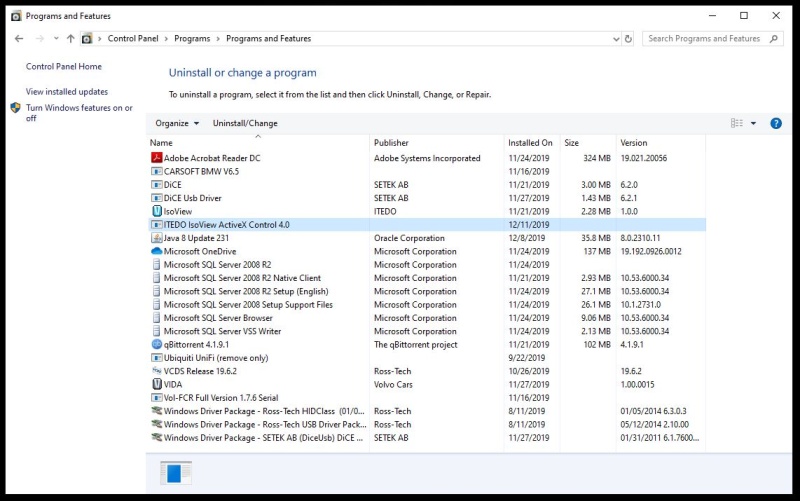
Image
• 1998 S70 N/A
• 1999 S70 N/A

xHeart
Posts: 3306
Joined: 3 December 2011
Year and Model: 2.0/3.2
Location: Great Lakes - USA
Has thanked: 113 times
Been thanked: 115 times

Post by xHeart »

cn90 often quotes Vince Lombardi - Winners never quit and quitters never win.

Thanks to RHP, following procedure has always worked for me.
HP Laptop, Centrino, 3GB, Windows 10 Pro, VIDA DiCE 2014D

PERPARATIONS:
a. Windows computer off
b. DiCE NOT plugged at either ends (OBD2/USB)
c. Key NOT in ignition
d. Car battery hooked up to a trickle charger -- take a battery read on multimeter for 13V+


MY KEY STEPS BEFORE VEHICLE COMMUNICATION:

1. Plug DiCE cable to vehicle's OBD2 port
1a: DiCE is powered up - moving lights - DiCE is drawing the battery down, trickle charger at work
1b: Key in Ignition POS 0

2. Start Windows OS
2a: Windows connected to Internet
2b: after Windows starts wait-and-wait for VIDA MONITOR to turn yellow and then green (loaded) at the task manager bar

4. right-click on VIDA All-in-One
4a: choose Run As Administrator

5. Login with #
6. Set up profile of your each vehicle(s) manually using VIN#

7. Choose vehicle - check and spec the field if needed, then visibly verify following:
7a: the communication field shows DiCE id#
7b: all tabs are active (readable/clickable in black)

8. NOW CONNECT DiCE to USB PORT -- listen for audible tone
8a: check/verify that DiCE is present under Device Manager
8b: check/verify that VIDA with vehicle profile is showing battery charge -- 13V or close

9. turn Key to POS II
9a: turn off ALL accessories
9b: notice change in VIDA read of battery charge
9c: wait for battery charge to stabilize

10. I DO NOT click on READ VEHICLE, but begin with DIAGNOSTIC tab for the first communication with vehicle


Anyone, please feel free to improve it with your proven experience.
--
Golden-German Shepherd | 2021 XC90 T6 INSCRIPTION (Nexa) | 2020 V60CC (Frska) | 2013A XC90 (Lktra)
Past: Golden Retriever | 2001 V70XC | 1997 Volvo 854 | 1989 Volvo 740 GL | 1979 Volvo 240

prefuse07
Posts: 9
Joined: 24 November 2019
Year and Model: 99 S70 NA
Location: San Francisco, CA
Has thanked: 6 times

Post by prefuse07 »

Ok, I did the following:

1. Connected to OBDII Port, wait 30 seconds seconds (Green and Blue Lights blinking)
2. Key to POS 2, wait for Dice lights to settle down (waited 30 seconds)
3. Logged in as "2"
4. Connected DiCE to USB port
5. Green Blinking, Yellow Solid, Red Blinking + Clicking from Dash
6. Clicked "Read Vehicle"

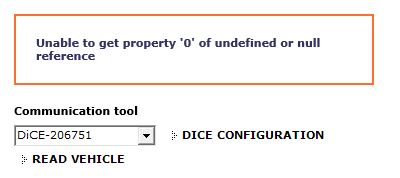
Again received the 0 exception error: Image

7. Clicked "Diagnostics" -- Nothing, happens, doesn't prompt to communicate with DiCE unit as before, just nothing. All options are greyed out.

8. Went back to Define Vehicle Profile
9. DiCE Diagnostic Test -- OK
10. Launched DiCE Diagnostics Programs > DiCE > DiCE Diagnostics
11. Ran DiCE Tests -- Doesn't even read that DiCE is connected this time, and I can't test it.

I still have some time to return this DiCE unit to the eBay seller, so I think I am going to do that. I give up at this point, unless I can find a proper DiCE unit. Not sure what to do with my volvos. On the 99, we installed the magnetic ETS, but now the ETS light is on, and it has the erratic idle problem, as well as P1053.

Ugh, I am seriously at wits end.
• 1998 S70 N/A
• 1999 S70 N/A

vonbaron
Posts: 13
Joined: 23 February 2019
Year and Model: 2005 XC70
Location: Tasmania

Post by vonbaron »

Some time ago I downloaded a complete VM image of Microsoft Windows 7 with VIDA 2014 all setup.
I run this VM image in VirtualBox straight from Debian 10 on a small dedicated Dell laptop which I store with my DICE unit.

My method of startup is typically:
Laptop is up and running Debian.
Start VirtaulBox image of VIDA.
Plug in the Dice into the ODB2 port and USB into laptop.
Select USB device in VirtualBox Device list, so the DICE become available to the guest system, Windows rather than Linux.
Wait for Windows to startup.
Wait a second or two for the VIDA monitor in the Windows system tray to go green.
On Windows Desktop, select VIDA All in One shortcut.
Login on VIDA start page as admin.

Now, often I will get the message as prefuse07 does, where 'Unable to get property '0' of undefined or null reference', but I simply ignore it as it does not seem to effect what I want to do in VIDA. I simply select the vehicle from the selection I have in the database and then head over to diagnostics tab to then see what is going on.

I have a Dice unit that looks the same as xHeart posted some posts ago, again, another ebay unit from China, the unit I have appears to work fine for me.

One question for xHeart, in your list above, at point 2a, I don't believe the computer needs to be connected to the internet.
Many times I would not even be near a WiFi access point and I don't use a long CAT5/6 Ethernet cable either.
I wouldn't imagine there would be any need for VIDA to connect to the internet.

So, prefuse07, have you entered the vehicle VIN and other details first up and then when the Okay button to the right become clickable, did you go to diagnostics tab to then see that VIDA starts reading in the module data over CAN bus ?

I mean, this whole VIDA and Microsoft Windows thing is a complete and utter mess of design stupidity.
But, in saying that, I do rely on it and am thankful for this at least.
I only wish I had time to re-engineer this up in a GNU/Linux environment using C/C++ and or Python to make it all open source and pain free :)

prefuse07
Posts: 9
Joined: 24 November 2019
Year and Model: 99 S70 NA
Location: San Francisco, CA
Has thanked: 6 times

Post by prefuse07 »

vonbaron wrote: 19 Dec 2019, 05:23
So, prefuse07, have you entered the vehicle VIN and other details first up and then when the Okay button to the right become clickable, did you go to diagnostics tab to then see that VIDA starts reading in the module data over CAN bus ?

I mean, this whole VIDA and Microsoft Windows thing is a complete and utter mess of design stupidity.
But, in saying that, I do rely on it and am thankful for this at least.
I only wish I had time to re-engineer this up in a GNU/Linux environment using C/C++ and or Python to make it all open source and pain free :)
The thing is, after I've entered my VIN, and selected the options (Engine, Sunroof, Trans, Country etc...) when I hit "Diagnostics" everything else within the diagnostics tab is greyed out / unselectable. It doesn't even prompt to try to scan/connect with the car (as it did before I reinstalled VIDA), it just sits there unaccessible.
• 1998 S70 N/A
• 1999 S70 N/A

evilaghy
Posts: 5
Joined: 19 December 2019
Year and Model: 2001
Location: New York

Post by evilaghy »

cant get the torrent to work. no torrent...

User avatar
RickHaleParker
Posts: 7129
Joined: 25 May 2015
Year and Model: See Signature below.
Location: Kansas
Has thanked: 8 times
Been thanked: 958 times

Post by RickHaleParker »

evilaghy wrote: 20 Dec 2019, 10:13 cant get the torrent to work. no torrent...
The torrent is still very active. (Lots of seeders)

The hyperlinks are dead but the magnet link is good. Read and follow the instructions for the magnet link.
⸙⸙⸙⸙⸙⸙⸙⸙⸙⸙⸙⸙⸙⸙⸙⸙⸙⸙⸙⸙⸙⸙⸙⸙⸙⸙⸙⸙⸙⸙⸙⸙⸙⸙⸙⸙⸙⸙⸙⸙⸙⸙⸙⸙⸙⸙⸙⸙⸙⸙⸙⸙⸙⸙⸙⸙⸙⸙⸙⸙⸙⸙⸙⸙⸙⸙⸙⸙⸙⸙⸙⸙⸙
1998 C70, B5234T3, 16T, AW50-42, Bosch Motronic 4.4, Special Edition package.
2003 S40, B4204T3, 14T twin scroll AW55-50/51SN, Siemens EMS 2000.
2004 S60R, B8444S TF80 AWD. Yamaha V8 conversion
2005 XC90 T6 Executive, B6294T, 4T65 AWD, Bosch Motronic 7.0.

User avatar
RickHaleParker
Posts: 7129
Joined: 25 May 2015
Year and Model: See Signature below.
Location: Kansas
Has thanked: 8 times
Been thanked: 958 times

Post by RickHaleParker »

prefuse07 wrote: 19 Dec 2019, 22:02 The thing is, after I've entered my VIN, and selected the options (Engine, Sunroof, Trans, Country etc...)
Sunroof option .....?

In script #2, did you install Vida all in one and leave the network configuration set for internet?

How to install Volvo VIDA 2014D
⸙⸙⸙⸙⸙⸙⸙⸙⸙⸙⸙⸙⸙⸙⸙⸙⸙⸙⸙⸙⸙⸙⸙⸙⸙⸙⸙⸙⸙⸙⸙⸙⸙⸙⸙⸙⸙⸙⸙⸙⸙⸙⸙⸙⸙⸙⸙⸙⸙⸙⸙⸙⸙⸙⸙⸙⸙⸙⸙⸙⸙⸙⸙⸙⸙⸙⸙⸙⸙⸙⸙⸙⸙
1998 C70, B5234T3, 16T, AW50-42, Bosch Motronic 4.4, Special Edition package.
2003 S40, B4204T3, 14T twin scroll AW55-50/51SN, Siemens EMS 2000.
2004 S60R, B8444S TF80 AWD. Yamaha V8 conversion
2005 XC90 T6 Executive, B6294T, 4T65 AWD, Bosch Motronic 7.0.

evilaghy
Posts: 5
Joined: 19 December 2019
Year and Model: 2001
Location: New York

Post by evilaghy »

Ugh I still cant get this to start. I've tried both patches. I've tried changing the date in the License file. It says invalid userb=name. The license file is located under c:\vida\vida\patch.

Windows 7 Pro 64 Bit

Thanks

Erik

evilaghy
Posts: 5
Joined: 19 December 2019
Year and Model: 2001
Location: New York

Post by evilaghy »

ok I figured it out but it would be nice to get it working through Bluetooth. I used this video:

https://www.youtube.com/watch?v=8yoBM1n0vzc

Post Reply
  • Similar Topics
    Replies
    Views
    Last post