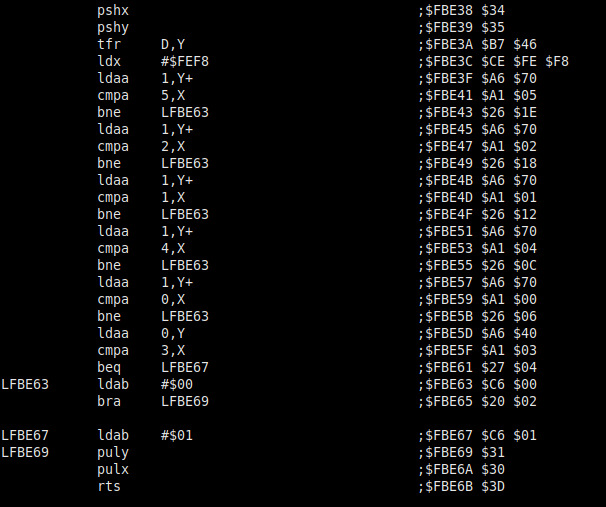
Try this one.
https://mega.nz/file/mXwCESyL#vN2Q6POKI ... YEiTxFnq68
or this one.
https://mega.nz/file/ub5ylAZT#13rLJlIFz ... K_a9Th0HUs
Both on my Mega account.
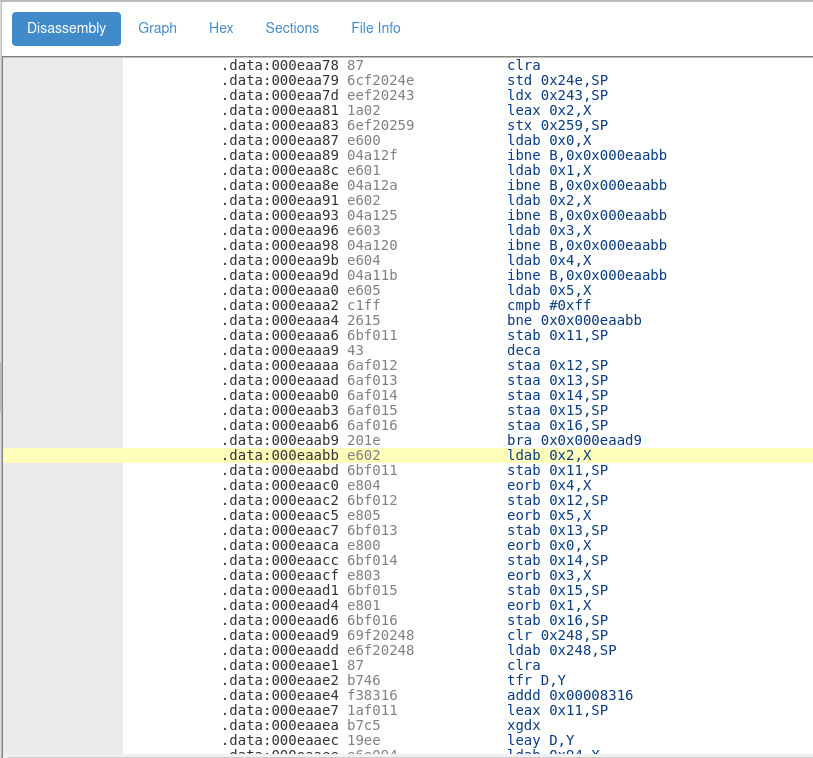
Try this one.
Thanks! I also found another set of files on Swedespeed, their layout is different.mikeak2001 wrote: ↑07 Sep 2021, 11:47 Try this one.
https://mega.nz/file/mXwCESyL#vN2Q6POKI ... YEiTxFnq68
or this one.
https://mega.nz/file/ub5ylAZT#13rLJlIFz ... K_a9Th0HUs
Both on my Mega account.
I did a blind grep session on the disassembled code and I think I found the routine. It looks a bit strange.


Very interesting, So there is definitely different methods that Volvo used to store/access the pin. This now add's a little complexity to the project due to fact in my situation, if i need to crack different years I will need to keep changing the file on the teensy.
mikeak2001 wrote: ↑08 Sep 2021, 12:37Very interesting, So there is definitely different methods that Volvo used to store/access the pin. This now add's a little complexity to the project due to fact in my situation, if i need to crack different years I will need to keep changing the file on the teensy.
I have two p1 cem's. one from 2011'ish and one from 2007. Both report the same part number so there is a chance that if a vehicle has had dealer software updates the pin order may get changed. hmmm....
Will definitely take a look at the website.
Really want to get into this reversing business but don't know how to deal with the page files.![]()
Shouldn't be needed. Add another shuffle order: https://github.com/vtl/volvo-cem-cracke ... er.ino#L62 and update last column for appropriate CEMs: https://github.com/vtl/volvo-cem-cracke ... er.ino#L72 The cracker will read the P/N and use the appropriate shuffle order automatically.mikeak2001 wrote: ↑08 Sep 2021, 12:37 Very interesting, So there is definitely different methods that Volvo used to store/access the pin. This now add's a little complexity to the project due to fact in my situation, if i need to crack different years I will need to keep changing the file on the teensy.
Yeah, we need to read software version as well, not only part number. Somewhere back in this thread I think I found the CAN message to read the sw number.mikeak2001 wrote: ↑08 Sep 2021, 12:37 I have two p1 cem's. one from 2011'ish and one from 2007. Both report the same part number so there is a chance that if a vehicle has had dealer software updates the pin order may get changed. hmmm....
VIDA shows all the hw/sw versions in the Diagnostic tab.swinokur wrote: ↑08 Sep 2021, 12:43 And I'm not sure that it is relevant, but I had my car in the shop for the "I just bought a used car should I keep it" inspection, and one of the things that they did was a software update.
If someone can let me know the 'right way' to pull all the software version numbers I'm happy to report them here. (I have 2014d, and vdash and a dice unit...)