


This ^ procedure Rick?RickHaleParker wrote: 19 Feb 2018, 11:21 On windows 10
1. Manually install .net framework 3.5.
2. Run scripts 1- 3, in the root directory of VIDA2014D_RePack.iso, one at a time.
3. Run the 2099 patch
4. Run Script 4
. Do not run Script 5
5. Reboot
6. Wait for Java to request a firewall exception.
7. Wait for Vida monitor to turn green.
If DiCE does not work correctly. Run DiCE setup in :\3PP\Products\DiCE\
Clean up: Uninstall Russian language Adobe reader and install English language Adobe reader.
Password: admin or 1 - 4 for specific Partner groups.
Vida 2014D Times out 12/31/2017 23:59 Topic is solved
-
xHeart
- Posts: 3321
- Joined: 03 Dec 2011, 08:05
- Year and Model: 2.0/3.2
- Location: Great Lakes - USA
- Has thanked: 116 times
- Been thanked: 119 times
--
Golden-German Shepherd | 2021 XC90 T6 INSCRIPTION (Nexa) | 2020 V60CC (Frska) | 2013A XC90 (Lktra)
Past: Golden Retriever | 2001 V70XC | 1997 Volvo 854 | 1989 Volvo 740 GL | 1979 Volvo 240
Golden-German Shepherd | 2021 XC90 T6 INSCRIPTION (Nexa) | 2020 V60CC (Frska) | 2013A XC90 (Lktra)
Past: Golden Retriever | 2001 V70XC | 1997 Volvo 854 | 1989 Volvo 740 GL | 1979 Volvo 240
-
RickHaleParker

- Posts: 7203
- Joined: 25 May 2015, 14:30
- Year and Model: See Signature below.
- Location: Kansas
- Has thanked: 8 times
- Been thanked: 979 times
Yes
Active
1998 C70, B5234T3, 16T, AW50-42, Bosch Motronic 4.4, Special Edition package.
2017 Ford PIU. 3.5l, Twin Turbo, 365 Hp.
............................
Past
2003 S40, B4204T3, 14T twin scroll AW55-50/51SN, Siemens EMS 2000. ( Killed by a plastic radiator. )
2004 S60R, B8444S TF80 AWD. Yamaha V8 conversion ( I moved, the project did not )
2005 XC90 T6 Executive, B6294T, 4T65 AWD, Bosch Motronic 7.0. ( Transmission dead after sitting for a winter )
1998 C70, B5234T3, 16T, AW50-42, Bosch Motronic 4.4, Special Edition package.
2017 Ford PIU. 3.5l, Twin Turbo, 365 Hp.
............................
Past
2003 S40, B4204T3, 14T twin scroll AW55-50/51SN, Siemens EMS 2000. ( Killed by a plastic radiator. )
2004 S60R, B8444S TF80 AWD. Yamaha V8 conversion ( I moved, the project did not )
2005 XC90 T6 Executive, B6294T, 4T65 AWD, Bosch Motronic 7.0. ( Transmission dead after sitting for a winter )
-
xHeart
- Posts: 3321
- Joined: 03 Dec 2011, 08:05
- Year and Model: 2.0/3.2
- Location: Great Lakes - USA
- Has thanked: 116 times
- Been thanked: 119 times
The Windows 10 Pro Upgrade was effortless. VIDA opens with X at communication tools, but I can browse INFORMATION tab for repairs and parts with no issue.
DiCE device communication will take debugging.
DiCE device communication will take debugging.
--
Golden-German Shepherd | 2021 XC90 T6 INSCRIPTION (Nexa) | 2020 V60CC (Frska) | 2013A XC90 (Lktra)
Past: Golden Retriever | 2001 V70XC | 1997 Volvo 854 | 1989 Volvo 740 GL | 1979 Volvo 240
Golden-German Shepherd | 2021 XC90 T6 INSCRIPTION (Nexa) | 2020 V60CC (Frska) | 2013A XC90 (Lktra)
Past: Golden Retriever | 2001 V70XC | 1997 Volvo 854 | 1989 Volvo 740 GL | 1979 Volvo 240
-
RickHaleParker
- Posts: 7203
- Joined: 25 May 2015, 14:30
- Year and Model: See Signature below.
- Location: Kansas
- Has thanked: 8 times
- Been thanked: 979 times
Vida DVD:\Install\Utils\EnableIEHostingxxx.reg .
Make sure you run the right one for your operating system.
xxx =x64 is for 64bit operating systems,
xxx =x86 is for 32bit operating systems
Reboot and login.
Active
1998 C70, B5234T3, 16T, AW50-42, Bosch Motronic 4.4, Special Edition package.
2017 Ford PIU. 3.5l, Twin Turbo, 365 Hp.
............................
Past
2003 S40, B4204T3, 14T twin scroll AW55-50/51SN, Siemens EMS 2000. ( Killed by a plastic radiator. )
2004 S60R, B8444S TF80 AWD. Yamaha V8 conversion ( I moved, the project did not )
2005 XC90 T6 Executive, B6294T, 4T65 AWD, Bosch Motronic 7.0. ( Transmission dead after sitting for a winter )
1998 C70, B5234T3, 16T, AW50-42, Bosch Motronic 4.4, Special Edition package.
2017 Ford PIU. 3.5l, Twin Turbo, 365 Hp.
............................
Past
2003 S40, B4204T3, 14T twin scroll AW55-50/51SN, Siemens EMS 2000. ( Killed by a plastic radiator. )
2004 S60R, B8444S TF80 AWD. Yamaha V8 conversion ( I moved, the project did not )
2005 XC90 T6 Executive, B6294T, 4T65 AWD, Bosch Motronic 7.0. ( Transmission dead after sitting for a winter )
-
prefuse07
- Posts: 9
- Joined: 24 Nov 2019, 11:31
- Year and Model: 99 S70 NA
- Location: San Francisco, CA
- Has thanked: 6 times
Hey Rick,
First, I want to thank you for the instructions -- got it working perfectly on my Windows 10 Pro machine, however, I am having difficultues with my DiCE unit (I suppose). When I login as admin, or as the numbers, every time I go to scan the car, I get the "not possible to read out information from the vehicle" error. When I input the car's info (VIN, Year, Bodystyle, Engine, Trans, etc...) and press OK, I am able to see the diagnostics function, but when I click on it, and after it tries to scan the car for DTCs, it gives me a "communication error"
The DiCE unit I have is from eBay, but not from China, here is the link to where I purchased the DiCE unit: https://www.ebay.com/itm/VOLVO-VIDA-DIC ... 1438.l2649
It probably is a chinese clone, that someone purchased a lot of and is selling as if it's a USA one. It has all of the correct color LEDS (Green, Blue, Yellow, Red) --- and when I am running VIDA, I can hear the dash / instruments clicking, along with the red light functioning as if it is indeed communicating with the car. I have tried it on both of my Volvos, to no avail (same error).
I have double clicked / installed the: Vida DVD:\Install\Utils\EnableIEHostingxxx.reg
I've also checked HKEY_LOCAL_MACHINE > SOFTWARE > MICROSOFT > .NETFRAMEWORK > and EnableIEHosting had the correct binary code: 00000001
Any thoughts?
First, I want to thank you for the instructions -- got it working perfectly on my Windows 10 Pro machine, however, I am having difficultues with my DiCE unit (I suppose). When I login as admin, or as the numbers, every time I go to scan the car, I get the "not possible to read out information from the vehicle" error. When I input the car's info (VIN, Year, Bodystyle, Engine, Trans, etc...) and press OK, I am able to see the diagnostics function, but when I click on it, and after it tries to scan the car for DTCs, it gives me a "communication error"
The DiCE unit I have is from eBay, but not from China, here is the link to where I purchased the DiCE unit: https://www.ebay.com/itm/VOLVO-VIDA-DIC ... 1438.l2649
It probably is a chinese clone, that someone purchased a lot of and is selling as if it's a USA one. It has all of the correct color LEDS (Green, Blue, Yellow, Red) --- and when I am running VIDA, I can hear the dash / instruments clicking, along with the red light functioning as if it is indeed communicating with the car. I have tried it on both of my Volvos, to no avail (same error).
I have double clicked / installed the: Vida DVD:\Install\Utils\EnableIEHostingxxx.reg
I've also checked HKEY_LOCAL_MACHINE > SOFTWARE > MICROSOFT > .NETFRAMEWORK > and EnableIEHosting had the correct binary code: 00000001
Any thoughts?
• 1998 S70 N/A
• 1999 S70 N/A
• 1999 S70 N/A
-
RickHaleParker
- Posts: 7203
- Joined: 25 May 2015, 14:30
- Year and Model: See Signature below.
- Location: Kansas
- Has thanked: 8 times
- Been thanked: 979 times
Try"prefuse07 wrote: 24 Nov 2019, 17:51 I get the "not possible to read out information from the vehicle" error.
1. Connect to OBDII port.
2. Key to POS II. wait for Dice lights to settle down.
3. Then connect the USB to the computer.
4. Make sure partner group is set to AME (North AMErica)
5. Try to read VIN.
In other words let the DiCE boot before you connect it to the computer.
Active
1998 C70, B5234T3, 16T, AW50-42, Bosch Motronic 4.4, Special Edition package.
2017 Ford PIU. 3.5l, Twin Turbo, 365 Hp.
............................
Past
2003 S40, B4204T3, 14T twin scroll AW55-50/51SN, Siemens EMS 2000. ( Killed by a plastic radiator. )
2004 S60R, B8444S TF80 AWD. Yamaha V8 conversion ( I moved, the project did not )
2005 XC90 T6 Executive, B6294T, 4T65 AWD, Bosch Motronic 7.0. ( Transmission dead after sitting for a winter )
1998 C70, B5234T3, 16T, AW50-42, Bosch Motronic 4.4, Special Edition package.
2017 Ford PIU. 3.5l, Twin Turbo, 365 Hp.
............................
Past
2003 S40, B4204T3, 14T twin scroll AW55-50/51SN, Siemens EMS 2000. ( Killed by a plastic radiator. )
2004 S60R, B8444S TF80 AWD. Yamaha V8 conversion ( I moved, the project did not )
2005 XC90 T6 Executive, B6294T, 4T65 AWD, Bosch Motronic 7.0. ( Transmission dead after sitting for a winter )
-
prefuse07
- Posts: 9
- Joined: 24 Nov 2019, 11:31
- Year and Model: 99 S70 NA
- Location: San Francisco, CA
- Has thanked: 6 times
Ok, I did the following:RickHaleParker wrote: 24 Nov 2019, 19:12Try"prefuse07 wrote: 24 Nov 2019, 17:51 I get the "not possible to read out information from the vehicle" error.
1. Connect to OBDII port.
2. Key to POS II. wait for Dice lights to settle down.
3. Then connect the USB to the computer.
4. Make sure partner group is set to AME (North AMErica)
5. Try to read VIN.
In other words let the DiCE boot before you connect it to the computer.
1. Connected to OBDII Port (Green and Blue Lights blinking)
2. Key to POS 2, wait for Dice lights to settle down (waited about 10 seconds)
3. Logged in as "admin"
4. Connected to USB port
5. Set region to AME
6. Clicked "Read Vehicle"
7. Green Blinking, Yellow Solid, Red Blinking + Clicking from Dash
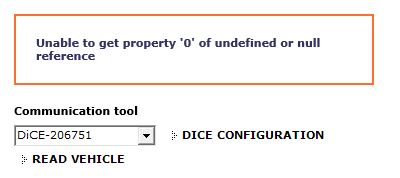
I received this error:
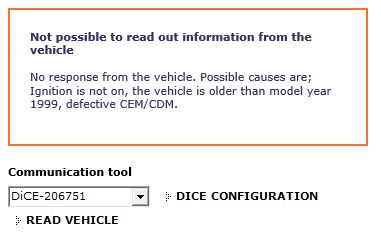
8. I added my VIN, and vehicle specs, and clicked "Read Vehicle" again, here is what happens:
Launching DiCE Configuration reveals:
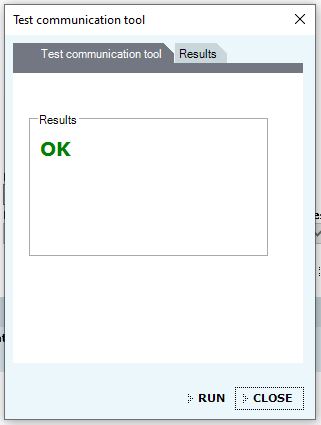
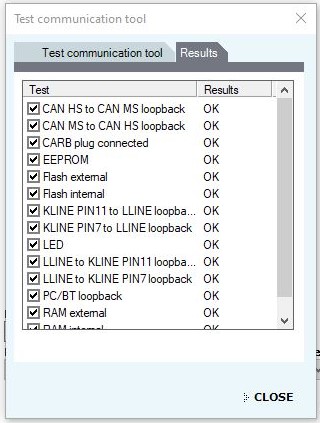
Launching DiCE Diagnostics and running the tests:
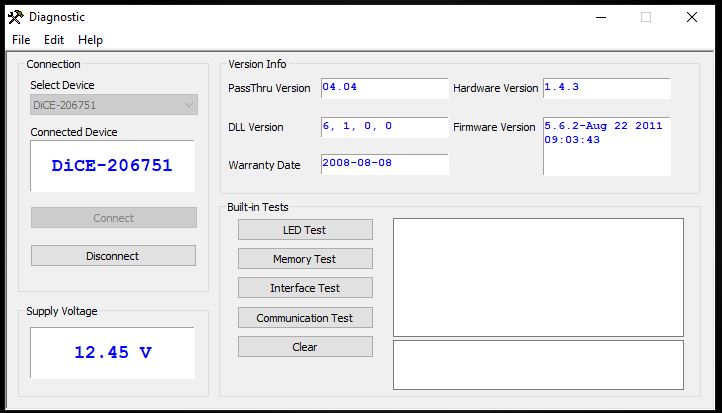
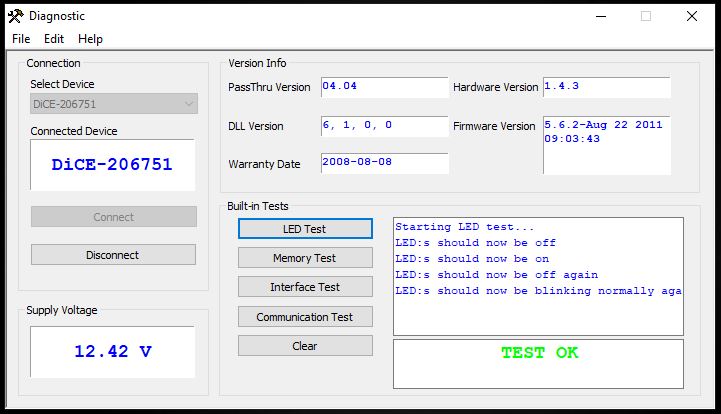
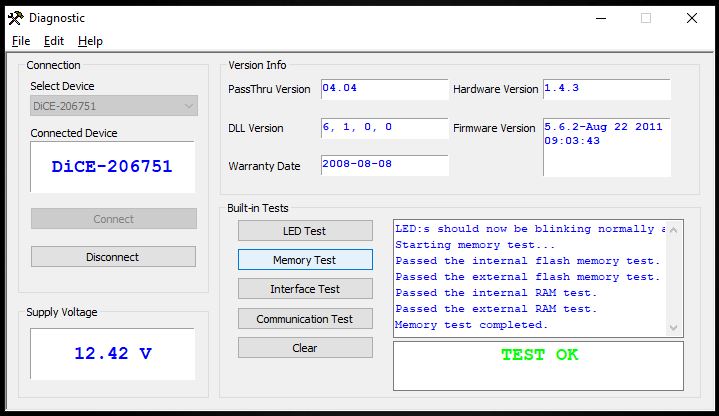
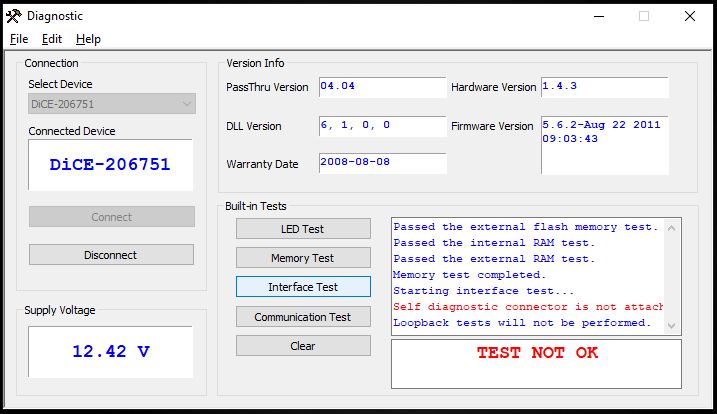
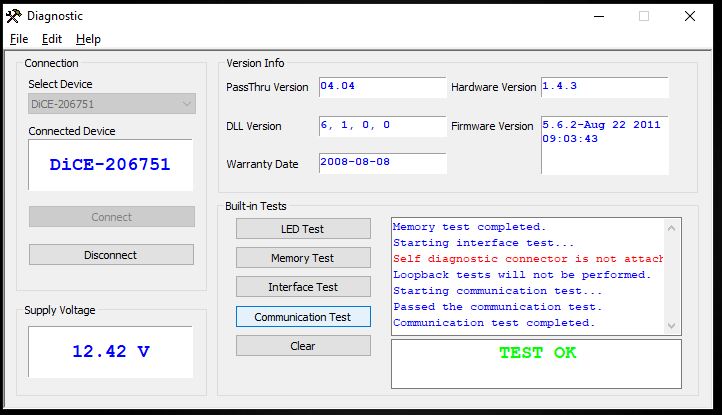
Back in VIDA, When I click Diagnostics, it tries to communicate with the vehicle, Green Blinking, Yellow Solid, Red Blinking + Clicking from Dash, It says "Communicating with CEM, CDM, DIM" Then I get this:
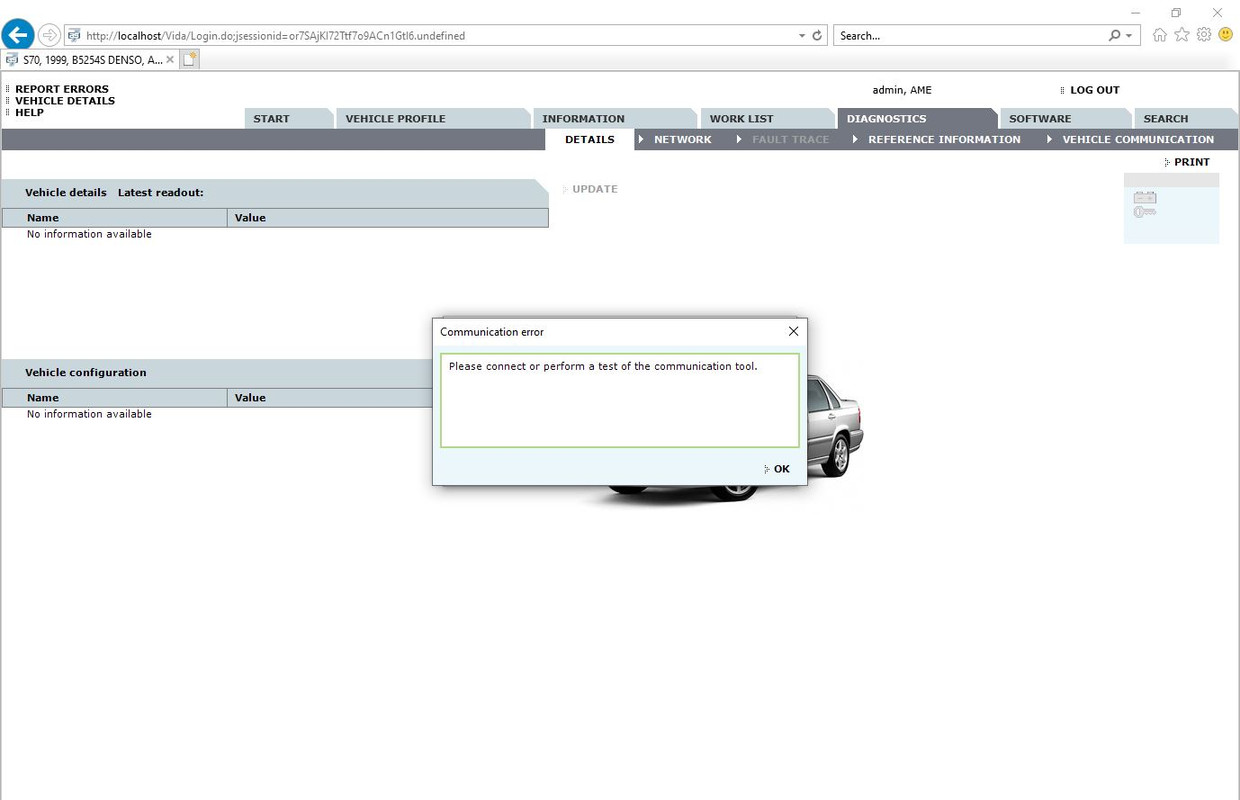
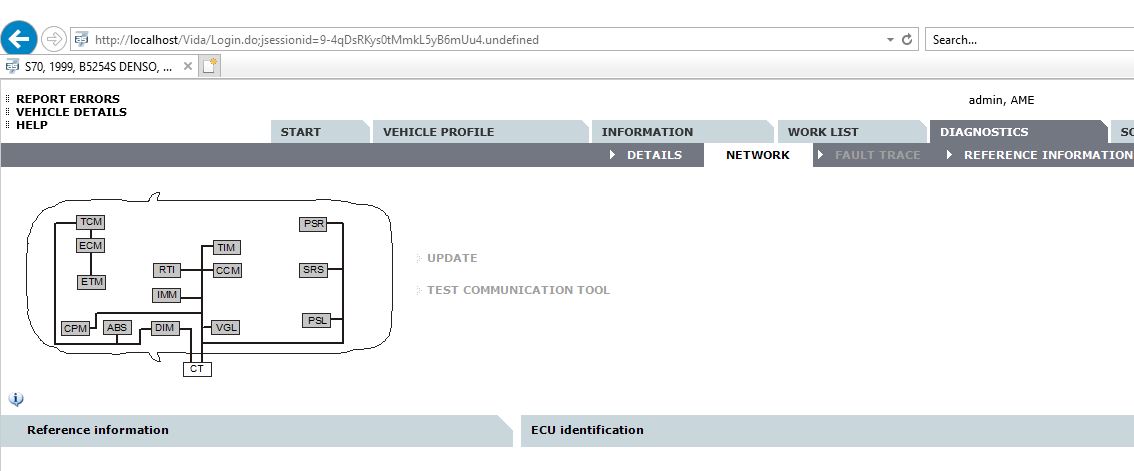
Fault Trace is greyed out after I click "OK" from the "Communication error" box:
• 1998 S70 N/A
• 1999 S70 N/A
• 1999 S70 N/A
-
RickHaleParker
- Posts: 7203
- Joined: 25 May 2015, 14:30
- Year and Model: See Signature below.
- Location: Kansas
- Has thanked: 8 times
- Been thanked: 979 times
Something went wrong in the install. Reinstalling over the existing install has always fixed it for me. Until you get this fixed, everything else is spinning your wheels.
Active
1998 C70, B5234T3, 16T, AW50-42, Bosch Motronic 4.4, Special Edition package.
2017 Ford PIU. 3.5l, Twin Turbo, 365 Hp.
............................
Past
2003 S40, B4204T3, 14T twin scroll AW55-50/51SN, Siemens EMS 2000. ( Killed by a plastic radiator. )
2004 S60R, B8444S TF80 AWD. Yamaha V8 conversion ( I moved, the project did not )
2005 XC90 T6 Executive, B6294T, 4T65 AWD, Bosch Motronic 7.0. ( Transmission dead after sitting for a winter )
1998 C70, B5234T3, 16T, AW50-42, Bosch Motronic 4.4, Special Edition package.
2017 Ford PIU. 3.5l, Twin Turbo, 365 Hp.
............................
Past
2003 S40, B4204T3, 14T twin scroll AW55-50/51SN, Siemens EMS 2000. ( Killed by a plastic radiator. )
2004 S60R, B8444S TF80 AWD. Yamaha V8 conversion ( I moved, the project did not )
2005 XC90 T6 Executive, B6294T, 4T65 AWD, Bosch Motronic 7.0. ( Transmission dead after sitting for a winter )
-
xHeart
- Posts: 3321
- Joined: 03 Dec 2011, 08:05
- Year and Model: 2.0/3.2
- Location: Great Lakes - USA
- Has thanked: 116 times
- Been thanked: 119 times
The battery must read and maintain above 13v over DiCE unit to read vehicle.
--
Golden-German Shepherd | 2021 XC90 T6 INSCRIPTION (Nexa) | 2020 V60CC (Frska) | 2013A XC90 (Lktra)
Past: Golden Retriever | 2001 V70XC | 1997 Volvo 854 | 1989 Volvo 740 GL | 1979 Volvo 240
Golden-German Shepherd | 2021 XC90 T6 INSCRIPTION (Nexa) | 2020 V60CC (Frska) | 2013A XC90 (Lktra)
Past: Golden Retriever | 2001 V70XC | 1997 Volvo 854 | 1989 Volvo 740 GL | 1979 Volvo 240
-
- Similar Topics
- Replies
- Views
- Last post
-
- 1 Replies
- 8075 Views
-
Last post by jonesg
-
- 6 Replies
- 5239 Views
-
Last post by matthew1
-
- 4 Replies
- 4546 Views
-
Last post by Liliflower
-
- 5 Replies
- 10350 Views
-
Last post by nickbw898
-
- 1 Replies
- 2776 Views
-
Last post by xiami