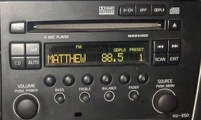
I followed a post here and on SwedeSpeed for the install so I won't discuss the installation process but feel free to ping me with questions.
- Almost done with the install - yes, those are dirty fingerprints on the screen.
- AppRadio_Install45-small.jpg (107.81 KiB) Viewed 9120 times
Installation is pretty easy as it’s a standard double-DIN headunit. From Matthews Amazon link above (of course!), I picked-up the radio, a wiring harness, antenna adapter and a double-DIN mount. A note about the mount; I wanted to keep the cubby but couldn’t find an aftermarket solution and didn’t see myself spending $85 bucks for the Volvo bracket. Upon pulling out the factory unit, it appears that the cubbie is really attached to the radio bracket and not the faceplate itself so all I have to do is cut a hole to match the cubby and I’m all set – how hard can that be?! I haven’t done it yet but I figure I’ll get around to it this summer.
Since I decided to keep the Volvo amp & speakers, I picked up an adapter cable that goes from the Volvo DIN plug to two pair of RCA plugs.
I also picked-up a rearview backup camera, but haven’t installed it yet. I need to figure out the best place to mount it and I’ve not spent the time on that task.
Another item I purchased is the Pioneer HML adapter kit which, now that I know what it is, is waaay too expensive. If I had known what it was, I’d have bought a few items from Amazon and saved a bundle. More on that later.
Shortly after finishing the install, I decided to get an anti-glare film to help with the flat screen. It will also help if the windows are tinted to reduce the amount of glare – even with the film, there’s some glare to deal with.
Installation was straight forward. If you’re not familiar with radio installation, it can be frustrating working in a cramped space but then, as a Volvo owner you must be used to it by now. The only difference is that instead of getting greasy and cutting your fingers on sharp metal, you get sweaty and cut your fingers on sharp metal. There’s a butt-load of cables to deal with; RCA jacks for the amp or wires running to the speakers, Android cable, iPod cable, GPS antenna, microphone wire, backup camera wire, steering wheel wire, light dimmer wire, radio antenna, handbrake wire, reverse wire and of course the power wires.
- Wires Everywhere
- A Dremel made quick work of the bits to be removed from the back of the Volvo bracket
I also picked up the PAC TR-7 universal trigger output module which replaces the e-brake wire connection. The reason for this connection is that the unit will not run most apps unless the handbrake is engaged. So you have to wire the AR to the handbrake and engage it twice (yeah, it’s smart enough to count to two) before the AR believes you to be stationary. Now I’m not one to watch movies when I drive, but the idea is that using this module allows me to use the apps I want to use instead of the limited apps from Pioneer. I must admit I didn’t program it properly so instead of waiting a few seconds, I have to wait a few minutes. One day I’ll correct my mistake.
For the reverse camera to work, Pioneer says you have to wire the headunit to the reverse gear. Nice. From what I’ve read, you can instead run a wire to a reverse bulb since the unit is just looking for a signal when you’re going backwards.
Now I have to say that I was expecting issues or problems to be present here and there. From what I understand, Pioneer uses Microsoft WindowsCE as the OS for the AppRadio. I’m pretty sure that having CE talk to an iPod or an Android is a huge mess! Anyway, I felt I could take the plunge and deal with any issues that came along thinking that Pioneer was developing this technology and should make huge strides as they go.
I have to say that their insistence on incorporating safety components has stripped away any functionality that we customize in our phones. It pretty much limits you to using their authorized apps when the car is not in motion. For the most part, I only play music which I load on my phone and that's about it. Having a phone interface and a map/GPS interface is nice. I have Torque and hope to use it on the screen, but other than that I really don’t have any other demands for this unit. Wishes would include being able to use the bigger screen to easily read webpages or watch videos on Volvo repairs

As I mentioned, my girls do have an iPod plugged into the unit. I don’t use it but I have seen them play music from it and I have to say it’s a little disappointing. If you skip forward a track, it takes about a second or two to display the track info. I’d be pissed if all I had was an iPod. One note about this; I’m pretty sure there’s an app to be loaded on the iPod and they didn’t load it so that may cause the issue. Also, since Pioneer only list iPhones as compatible, I’m not sure if that has anything to do with it. Again, I’m not an Apple guy.
There’s a website someone put up specific to Pioneer car audio and they have a forum specific to the AppRadios: http://avic411.com/index.php?/forum/62- ... appradio-2
Things that piss me off
So as I get older, I seem to get more and more cranky and it feels appropriate that I tell anyone near me about it. This is no exception.
Sometimes it doesn’t respond to a tap, or sometimes when you tap the Android icon, it scrolls the screen to the right. I had this problem before I applied the anti-glare film.
You have to leave your phone screen on. How dumb is that?! To make it worse; my phone uses more juice than the adapter can provide so no matter what I’m doing, I’m losing battery power. This is because of the phone and not the radio. The phone, since it uses the HML cable, is limited to getting 500 milliamps due to the pin-outs and it uses more than that. Since the theory is that you should never have to touch your phone, what’s the point of keeping the screen on?!
Volume control is odd in that the volume buttons on the phone affect the loudness in conjunction with the AppRadio buttons. I’m not an expert on HDMI but I was under the impression that it sent line-level audio signal and having the phone buttons control sound seems stupid. The volume control on the iPod does not affect the AppRadio.
There have been a few times that I’ve been near the car while the AR is on but not had the phone connected to the cable and I receive a call. I start talking but suddenly realize that it’s connected via Bluetooth and the voice comes over the radio speakers. Weird.
Even though I installed the PAC TR-7 to override the handbrake issue, the AR doesn’t actually let me use its screen to control the non-AR apps. When I touch the screen when running a non-AR app, I get a red X telling me I’ve been naughty. I have to use my phone to run everything and simply watch the screen. What’s even more frustrating is that I sometimes get the red X when I’m running their apps!
It appears that the GPS antenna is activated only by the ‘authorized’ map program so I lose GPS signal all the time when using the map program from Sprint that came with my phone. That totally sucks since it’s much better than what they’ve done to Google Maps.
Speaking of Google Maps, their implementation is horrific. It crashes when you try to look-up a contact. You can’t display a map without all of the text boxes covering half of the screen. If you touch the screen for any reason, it’ll revert back to a map instead of a satellite image. Also if you touch it for any reason, it’ll lose its setting to stay centered on you. Worst of all (and this is Google’s fault) there’s no voice for the turns. You have to look at the screen to figure out where you are and what you have to do next. That takes your eyes off the road too much. Sprint gives me “TeleNav GPS Navigator” and it’s really good. I just want to use it!
Their music program is almost as bad. When it starts, you see a list of songs alphabetically, not a Play button as one would expect. The button to get to the screen where you can hit the Play button is so small that it takes several attempts to tap it before it works. I blame the small size as well as the app not responding quick enough. You can also just tap the ‘shuffle’ button and it’ll start playing a song. Play lists are easy to create but so difficult to manage that it’s not worth the effort.
It takes a moment or two for the phone & AR to sync up and get ready to work. Sometimes it's too long, and sometimes it craps out and doesn’t work at all.
You have to install their keyboard app which doesn’t have a voice-command button. I’m not sure when I need to actually use their keyboard, but it makes no sense to have a separate keyboard app. I’m guessing it’s all part of their corporate legal team being paranoid that they may get sued for some idiot not paying attention when they drive.
Last thing I can think of that pisses me off; there’s a ground whine that I can’t get rid of. When the lights dim, it changes tone. When the 4C suspension makes a noticeable adjustment, it changes tone. When you turn off the unit or unplug the phone, it goes away. I pulled the unit and did some testing with a grounding strap but still have the same problem. I’m not totally convinced it’s the fault of the AR but it sure doesn’t help the situation.
Light at the end of the tunnel
I don’t expect Pioneer to make the vast improvements necessary to meet the market demands, but there is hope; an app for the Android - ARLiberator for AppRadio – appears that it will let you use the AR “as expected”. I’ve not installed the app but plan to very soon. If you do some Googling, you'll find some videos on YouTube of people that have installed it and show how well it works. The app is $35 and requires you to root your phone. I was able to find a few videos on YouTube on how to root it and it looks pretty easy. I'm about to pull the trigger on this. I’m not sure if I would still need the PAC TR-7 after this app is installed, but I believe I would not.
Summary
I dunno, it’s all a royal pain that Pioneer isn’t making any major improvements. Because ARLiberator is available I don’t plan on replacing it but as it stands now I do get cranky once in a while when I’m using it. Plus, with all the additional expenses I put out for it and the level of frustration, it's been hard to think about the additional expense of completing the installation with the rearview camera, dimmer switch and the steering wheel controls. I’m a single guy and really want something to have a boom-wow-cool factor when I’m on a date, you know?! I'm pretty sure the ARLiberator will bring a Zen-like calmness to me soon. I’ll keep you posted.
Parts used:
Scosche VO4152B 2005-2007 S60/S70 ISO Double DIN - https://www.amazon.com/gp/product/B0018BQT6O
Metra Volvo Antenna Adapter (40-VL10) (40-VL10) - https://www.amazon.com/gp/product/B000329HFE
PAC TR-7 UNIVERSAL TRIGGER OUTPUT MODULE - https://www.amazon.com/gp/product/B004XJGQMA
Lexerd - Pioneer AppRadio 2 SPH-DA100 TrueVue Anti-glare In-Dash Screen Protector - https://www.amazon.com/Lexerd-AppRadio-S ... B00B9FKBE0
Aftermarket HU to Volvo Factory Amp Cable - http://www.omnilam.com/cables.html
Metra 70-9221 Radio Wiring Harness - https://www.amazon.com/Metra-70-9221-Rad ... B0002BEVAW
What I should have bought for the power adapter:
So the adapter kit from Pioneer is nothing more than a power adapter that gets hardwired to the car and plugs into a HDMI to HML adapter cable. All you need is a Micro USB to HDMI MHL Adapter like this one: https://www.amazon.com/gp/product/B005F9W6DU - I’ve not bought this one nor am I associated with it, just found it quickly. You’d also need to get a USB charger and either deal with it hanging out of a cigarette lighter or get it hardwired and hidden. Issues I see with this particular MHL adapter are that the wire length is very short (the Pioneer kit is like 18 inches long) and since the USB plug is on the side, it’ll get a little bulky. At the moment I have the adapter wedged between the center console and the driver’s seat. The wire lays over the e-brake handle when not in use and is sorta hidden because everything is black. Once the phone is connected, it sits on my lap or in a cup holder since I have to touch the screen once in a while.
What I want to do is get a docking station and have it installed where the nav screen pops up. But, if I can use ARLiberator and never have to touch the screen, then there’s no need to keep it in reach and I’ll probably do one of two things; one is to just make a small hole in the map pocket on the driver’s seat, pull the cable through it and leave it hidden in the pouch while I drive. The problem I see with that is the screen still has to be on and any movement may cause the screen to be touched. I also had the idea of mounting a docking station on the driver’s side of the center console, low over the slim kick panel that can be removed. That way it’s easy to reach from the driver’s seat but completely out of the way. My leg may brush against it, but I think it'd be a smart spot for an install.